Headroom FAQ

Everything you need to know about the context compression layer for AI agents

77,036
Stars
5,977
Forks
226
Contributors

Compress everything your AI agent reads — tool outputs, logs, RAG chunks, files, and conversation history — before it reaches the LLM. Same answers, fraction of the tokens.
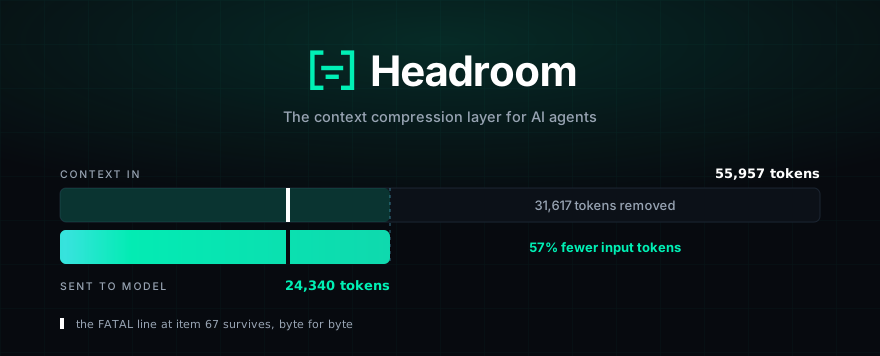
Headroom compression demonstration

Frequently Asked Questions

Find answers to common questions about Headroom, how it works, and how to get started.

What is Headroom? +

Headroom is a context compression layer for AI agents. It compresses everything your AI agent reads—including tool outputs, logs, RAG chunks, files, and conversation history—before it reaches the LLM. This means you get the same answers but with a fraction of the tokens, leading to significant cost savings and faster response times.

Headroom runs locally on your machine, ensuring that no prompt or file content is sent anywhere to be compressed. It works as a library, a proxy, or by wrapping your existing AI agents.

How does Headroom work? +

Headroom uses a multi-stage pipeline to intelligently compress context:

  1. ContentRouter: Detects the content type (JSON, code, prose, etc.) and selects the best compressor.
  2. SmartCrusher / CodeCompressor / Kompress-v2-base: Specialized compressors for different content types.
  3. CacheAligner: Flags volatile content that would disrupt a provider's KV-cache, ensuring prompt caching remains effective.
  4. CCR (Cacheable Compressed Retrieval): Stores originals locally and allows the model to retrieve them on demand using tools like headroom_retrieve.

This process is reversible, meaning the original content is always available if the model needs it.

What kind of compression savings can I expect? +

Savings depend on the type of content being compressed. Here are some real-world examples:

Scenario Before After Saved
Code search (100 results) 17,199 13,597 21%
SRE incident debugging 55,957 24,340 57%
Codebase exploration 58,801 33,895 42%
GitHub issue triage 46,067 32,429 30%

Highly repetitive content, like JSON arrays and logs, can see reductions of 90% or more.

Is the compression accurate? Will it affect the quality of my AI agent's responses? +

Yes, the compression is designed to be highly accurate. We've run benchmarks on standard datasets to ensure there's no detectable loss in quality:

Benchmark Category Baseline Headroom Delta
GSM8K Math 0.870 0.870 ±0.000
TruthfulQA Factual 0.530 0.560 +0.030

At our scale, the delta for TruthfulQA falls within the confidence interval, showing no detectable difference. The SQuAD v2 and BFCL benchmarks also show 97% accuracy at significant compression levels.

Which AI agents are compatible with Headroom? +

Headroom offers extensive compatibility with major AI coding agents and tools. You can use it as a library, a proxy, or by wrapping specific agents.

Full `headroom wrap` support:

  • Claude Code
  • Codex
  • Grok CLI
  • Aider
  • Copilot CLI
  • OpenClaw
  • OpenCode
  • Cline
  • Continue
  • Goose
  • OpenHands
  • Mistral Vibe
  • Oh My Pi
  • Kimi CLI
  • ZCode

Proxy support: Any OpenAI-compatible client works through the `headroom proxy` command. This includes VS Code Copilot and other third-party tools.

Manual setup: Cursor requires a manual setup, but Headroom can start the proxy and print the necessary configuration URLs.

For a complete list and detailed setup instructions for each agent, please refer to our Agent Compatibility documentation.

How do I get started with Headroom? +

Getting started with Headroom is designed to be quick and easy. You can be up and running in under 60 seconds.

1 — Install
uv tool install --python 3.13 "headroom-ai[all]"
pip install "headroom-ai[all]"
npm install headroom-ai

2 — Pick a mode
headroom deploy (turnkey local deployment)
headroom wrap claude (wrap a coding agent)
headroom proxy --port 8787 (drop-in proxy)

3 — Check it and watch the savings
headroom doctor (health check)
headroom perf (performance metrics)
headroom dashboard (live savings)

You can also use Headroom as a library directly in your Python or TypeScript applications. See our Quickstart guide for more details.

What is the difference between the open source version and Headroom for Teams? +

Headroom OSS is designed for individual developers on a single machine. Headroom Enterprise is built for teams and organizations.

Feature Open Source Enterprise
Savings Compression + tool search (Anthropic) All of OSS + tool search for all models + harness tuning + extra compressors
Model Routing Rule-based and opt-in Automatic (cheaper model when quality allows)
Security — Detects prompt injection and risky tool calls
Rollout Per laptop Managed or in your VPC, SSO, central config
Support GitHub, Discord Dedicated engineers, onboarding, priority response

Special Offer: Companies that sign a 12-month Enterprise plan get their first 3 months free. Claim 3 months free →

What are the system requirements for Headroom? +

Headroom requires **Python 3.10+** for its core functionality. The installation method varies:

  • macOS / Linux: Native wheels are available for Apple Silicon and x86_64. On Intel macOS, a Docker install is recommended until native wheels are available.
  • Windows: Native wheels are available for win_amd64.
  • ARM64: Supported on Linux and Apple Silicon. No AVX2 requirement.

CPU Requirement (x86/x86_64): The ONNX-backed features (Magika content detection and embedding relevance) require AVX2. On hosts without AVX2, Headroom gracefully falls back to non-ONNX paths (BM25 relevance, heuristic detection) instead of crashing.

For corporate networks with SSL inspection, specific environment variables may be needed to trust custom CAs. See our Corporate Networks guide for details.

How does telemetry work in Headroom? +

Headroom includes an anonymous telemetry beacon that is **on by default**. This beacon reports high-level usage data to help the development team understand how the tool is used in the wild. It never sends prompts, completions, code, or file paths.

The data collected includes:

  • Compression ratios and token savings
  • Request counters
  • Provider and model IDs
  • Operating system and architecture

This telemetry is crucial for identifying when a release might regress performance across real-world workloads, allowing for faster improvements.

You can disable telemetry by setting any of these environment variables: HEADROOM_BEACON=off, HEADROOM_TELEMETRY=off, DO_NOT_TRACK=1, or HEADROOM_OFFLINE=1.

What is the license for Headroom? +

Headroom is licensed under the Apache License 2.0. This permissive license allows you to use, modify, and distribute the software freely, even for commercial purposes. The only requirement is to include the original license and copyright notice in any copies of the software you distribute.

All code in this repository is open source. The Kompress-v2-base model is also available on Hugging Face and is subject to its own license terms.

Ready to compress your AI context?

Join thousands of developers saving tokens and improving performance with Headroom.

Get Started Now